Meet Allie, the AI agent for facilities management.
She runs your small, remote and unmanned sites almost entirely on her own, and gives your team the time to manage more properties, more effectively. Always inside the rules you set, with our 24/7 team behind her.
- 04:05Closed out the level 4 leak at Customs House: 4 photos, key returned, tenant updated.Undo
- 02:40Reviewed the plumber's work at height permit against the work order and SWMS: looks consistent.Undo
- 02:16Raised an urgent work order and sent it to the plumber on the service agreement.Undo
- 02:14Replied to a tenant at Customs House about water through the ceiling, with safe steps to take.Undo
- 00:30Filed a fire services report against the plan at Harbour City: 22 pass, 2 defects, 2 work orders drafted.Undo
The sites no one visits, run by Allie.
Small, remote and unmanned sites still get leaks, tenant questions, contractor visits and compliance deadlines. Allie handles almost all of it herself, and your team reviews it in the morning.
Tenants
Reads and replies to tenant emails at any hour, and keeps them updated through to close-out.
Contractors
Raises the work order and sends it to the contractor on the service agreement, only if their compliance is current.
Permits and access
Reviews each permit against the job and the SWMS. Accessly Keysafe releases only the key the permit covers.
Compliance
Files every service report against the plan and keeps the building's compliance register current.
Escalation
Anything outside her rules goes to your team, or to our 24/7 operations team, day or night.
Your morning
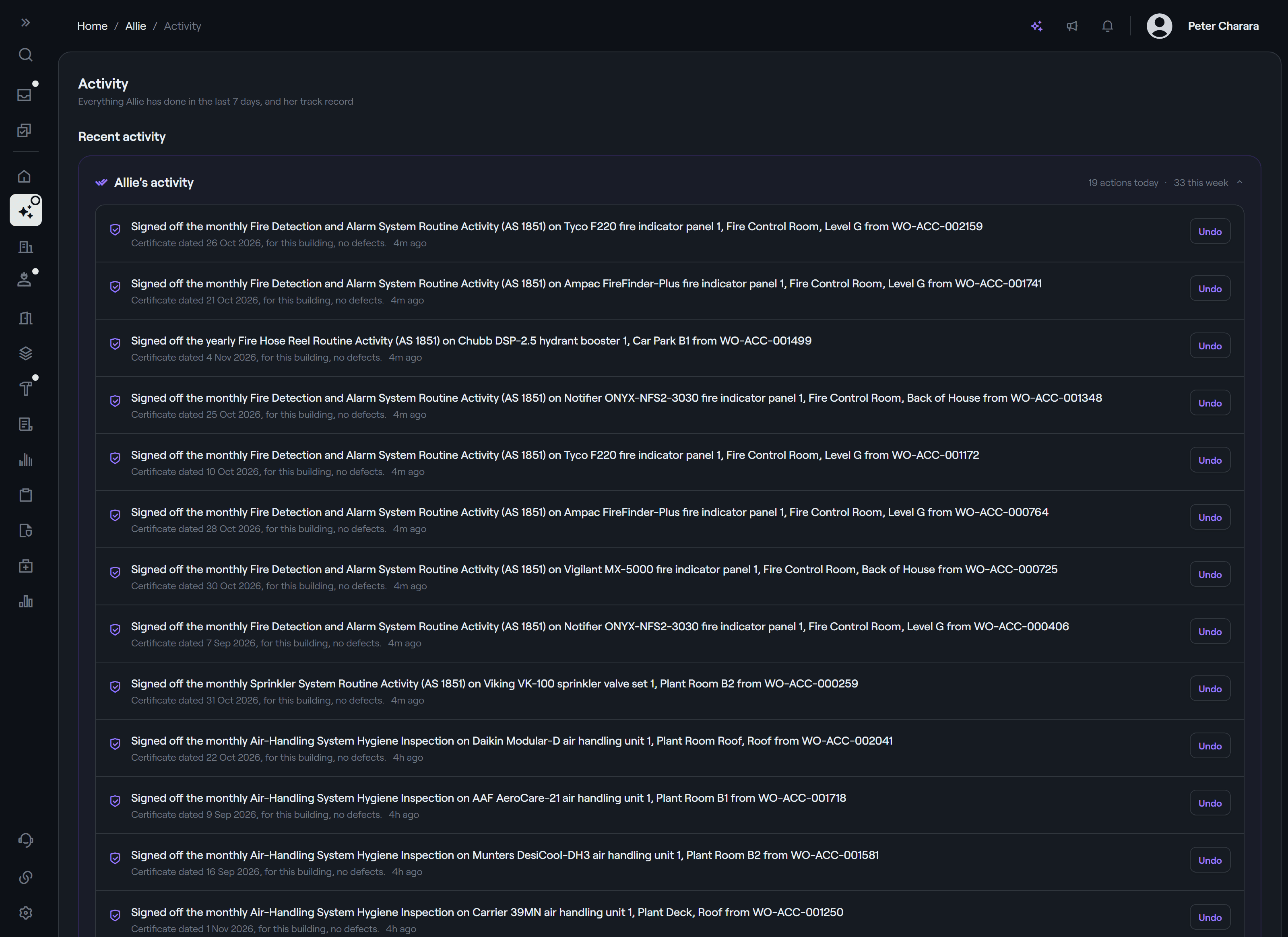
Every action is on her activity log, each with Undo. Approve, reopen or ask her a follow-up.
2:14am. No one on site. Handled by morning.
One night at a building with no one on it, step by step. Every step is something Allie does today.
- Tenant: Water is coming through the ceiling near the lifts.
- Allie: Thanks for letting us know. A plumber is being arranged now. Please keep clear of the area and move anything you can.
Everywhere else, more time for your team.
At your larger sites, Allie takes on the admin and data entry, so your team can manage more properties, more effectively. She works in three ways.
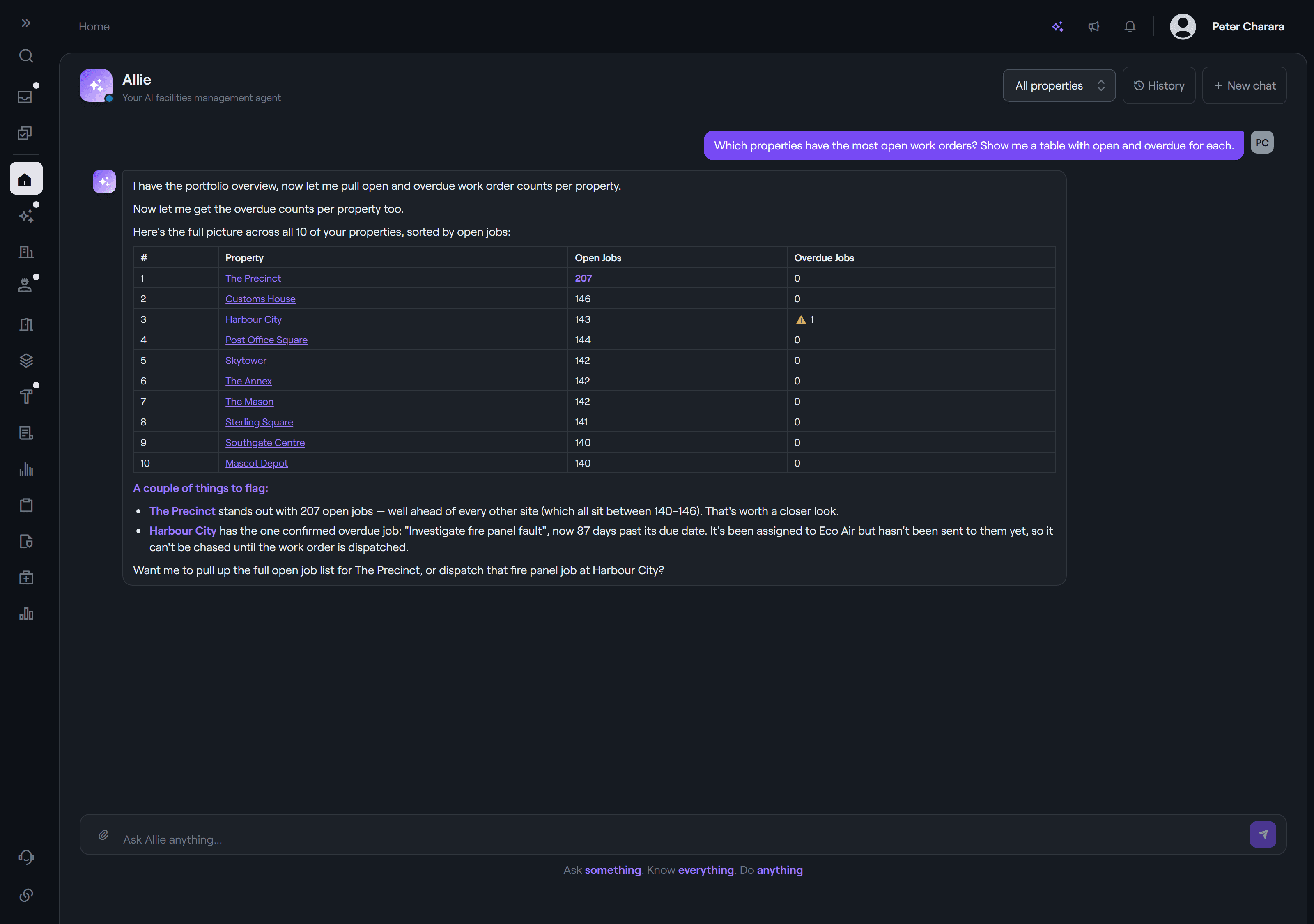
Ask anything. Get the answer from live data.
Compliance status, asset history, who's on site, what's overdue. If it's in your portfolio, Allie can answer it, and every answer comes live from your system.
- Ask from anywhere in AccesslyOS with ⌘K
- Drawn live from 80+ data tools across every module
- Insights on what needs your attention
- Searches the web for a standard or a safety data sheet when it helps
The work, prepared. You approve it in one click.
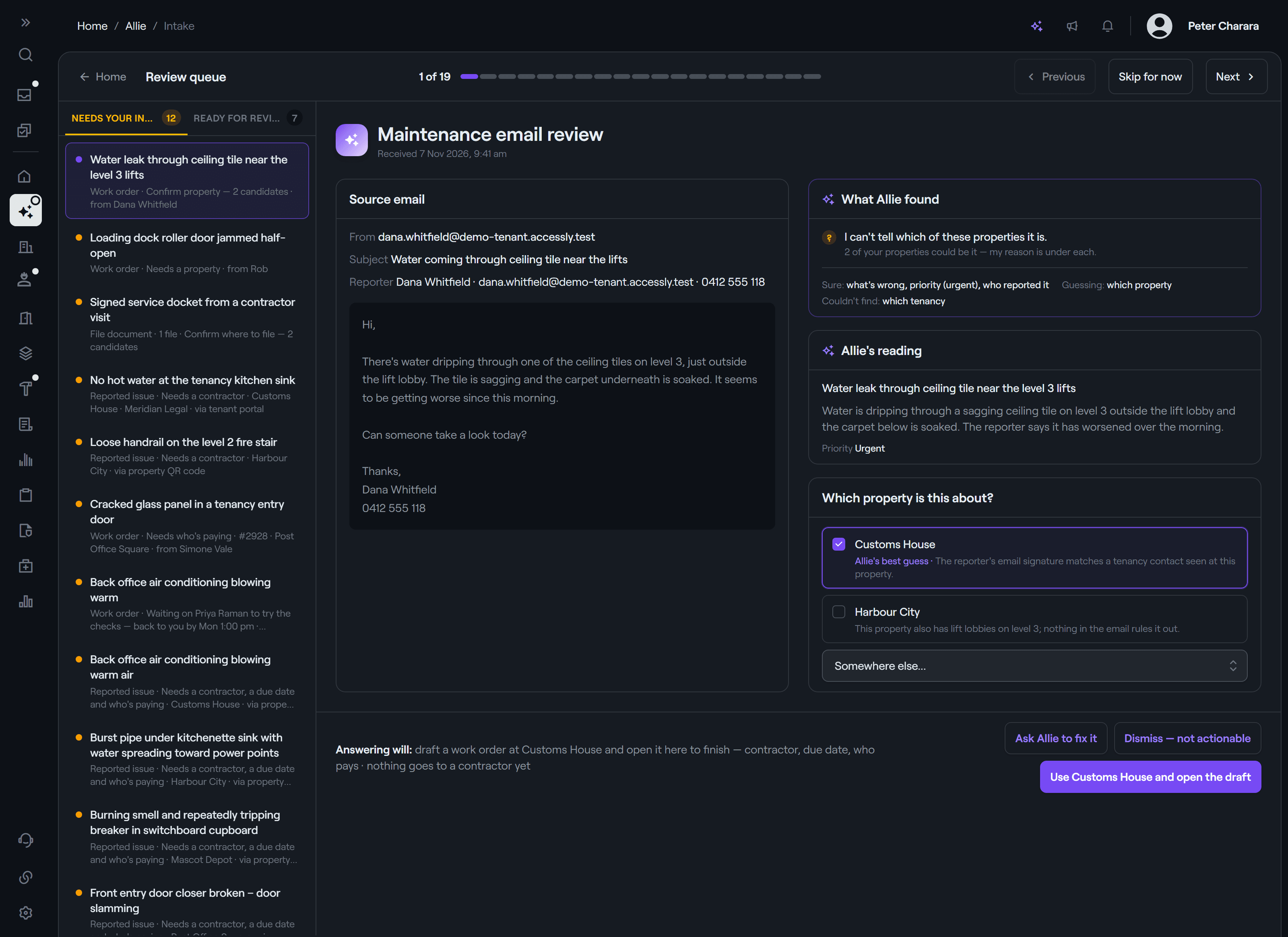
Set a capability to Draft for approval and Allie does the legwork, then leaves it in your review queue: matched, filled in and ready to send.
- Raises work orders from emails to your intake address, matched to the right property
- Drafts a reply to the person who reported it, with safe checks to try first
- Analyses quotes as they arrive, and drafts quote requests
- Prepares inspections from your team's emailed instructions
- Reads forwarded certificates and proposes where they're filed
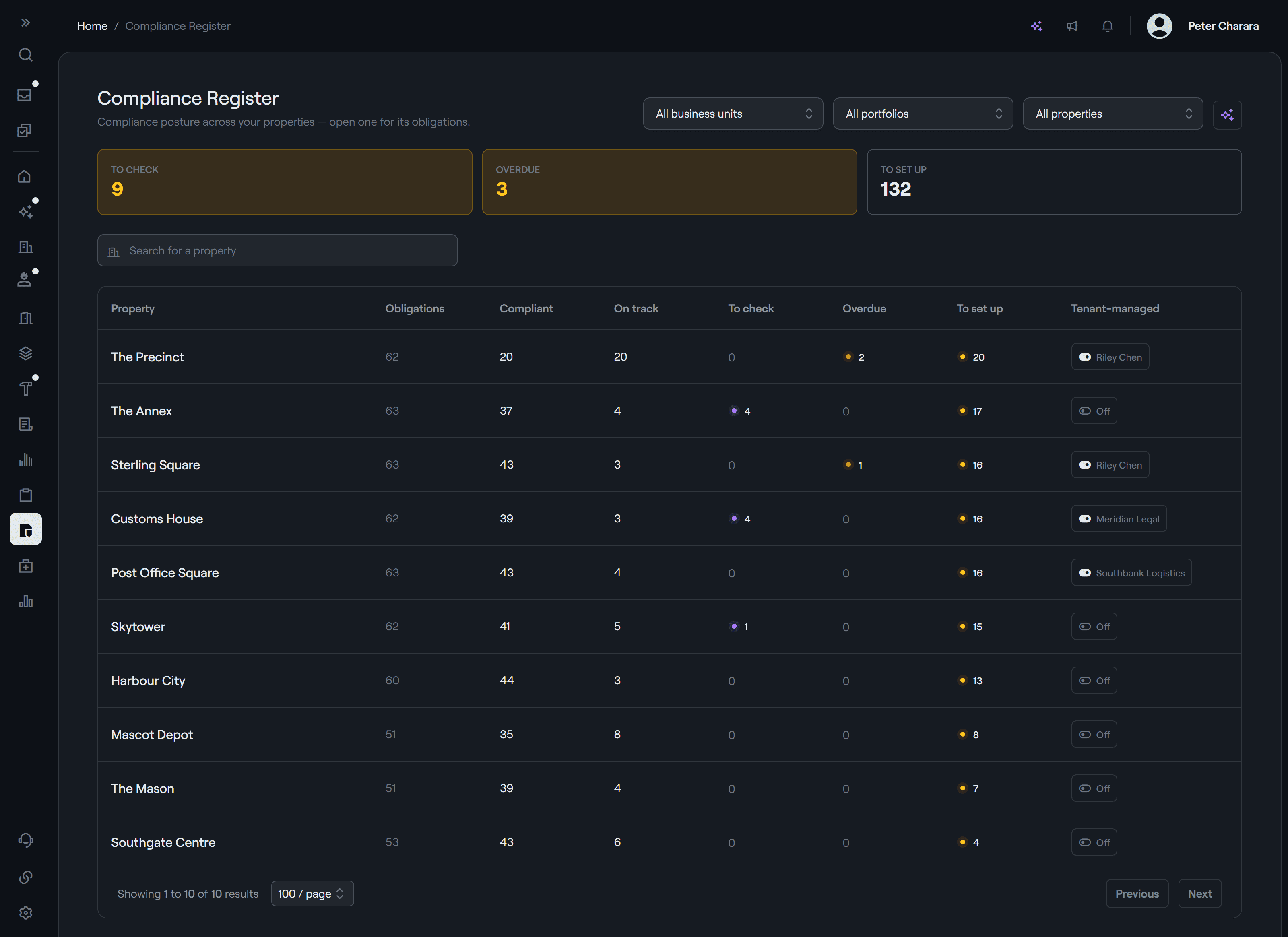
A compliance register that keeps itself.
Every night, and as soon as a finished job's certificate is read, Allie works each building's register.
- Signs off work whose certificate is for that building and passes
- Links equipment when only one item fits
- Sets up missing timings, and chases late work
- Anything that needs a decision waits for you, with what she would do
Every permit reviewed. Clean ones approved.
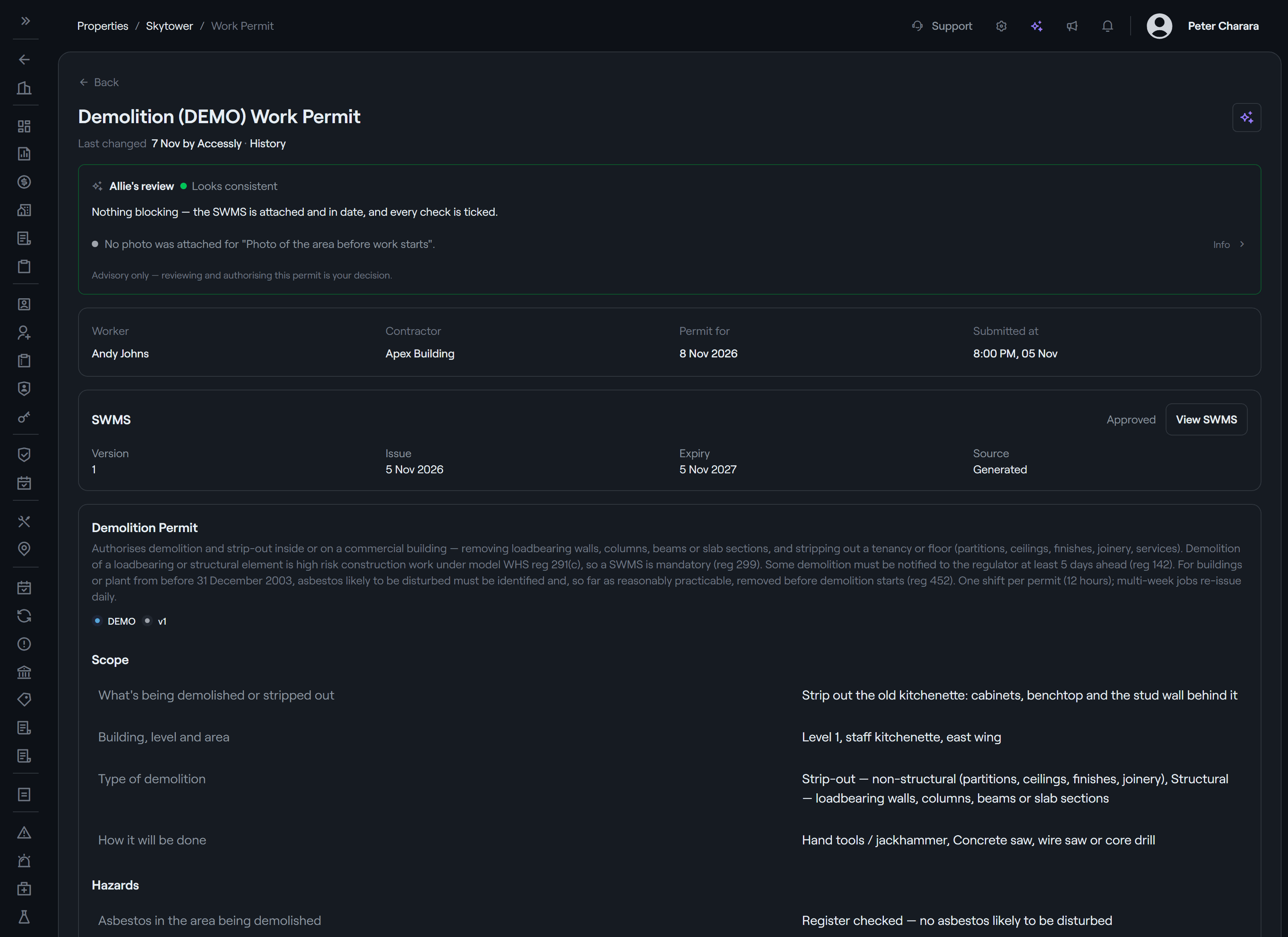
Allie judges each submitted permit against its work order and SWMS. When you allow it, she approves the clean ones herself, recorded as approved by Allie.
- A verdict on every permit, as a heads-up
- Approval only when you turn it on
- Minor gaps always wait for a person
You decide what she does. Action by action.
Each thing Allie can do has its own setting, chosen by your account admins and audit-logged. How much she handles on her own is up to you, and you can change it any time.
- Off
- Allie doesn't act. The capability is off for your whole account.
- Draft for approval
- Allie prepares the work; you check it and send it.
- Autonomous
- Allie completes the action and shows you what she did, with Undo on every line.
Works where you work.
Talk to Allie in AccesslyOS or by email. Or connect Accessly to the AI tools your team already uses, and work with your portfolio from there.
Private by design. Built on Claude.
Allie is included in every plan and works for your facilities team. Your administrator can turn AI features off.
Built on Claude, in Australia
Allie uses Anthropic's Claude models, run by AWS on Amazon Bedrock in Sydney and Melbourne.
Not used to train models
What is sent to Allie is used only to answer that request. AWS doesn't store it or use it for training, and Anthropic has no access to it.
Your data, your permissions
She sees only your account, and only what the person asking is allowed to see. Conversations stay in Accessly's database in Sydney.
The details are in our privacy policy.
Questions about Allie
Can Allie run a site with no one on it?
Yes. At small, remote and unmanned sites she handles almost everything herself: she replies to tenants, raises the work order and sends it to the right contractor, reviews their permit, and closes out the job, with Accessly Keysafe releasing only the key the permit covers. Anything outside your rules goes to your team or our 24/7 operations team, and everything she does is logged, with Undo.
Is Allie included in our plan?
Yes. Allie is included in every Accessly plan. She isn't a paid add-on.
Will tenants and contractors know they're dealing with Allie?
Yes. Every message Allie sends is signed as Allie, AI Facilities Coordinator, with the name of the person on your team who oversees her. Anyone can reach a person whenever they need to.
What can Allie do on her own?
Only what you allow. Each thing Allie can do is set to Off, Draft for approval or Autonomous for your account. You can change those settings any time, and anything outside your rules waits for a person.
Who is accountable for what Allie does?
Your team sets the rules and stays accountable for them. Every action Allie takes is logged with what she did and why, and can be undone. When something falls outside her rules, it goes to a person: your team, or our 24/7 operations team.
Where does our data go?
Allie uses Anthropic's Claude models, run by AWS on Amazon Bedrock in Australia. What is sent to Allie is used only to answer that request: AWS doesn't store it or use it to train AI models, and Anthropic has no access to it. Conversations are kept in Accessly's database in Sydney.
Can we use our own AI tools instead?
Yes. Connect Accessly to Microsoft Copilot, Claude or ChatGPT and work with your portfolio from there. Your administrator decides which tools are connected, and can turn AI features off.
Give Allie a site.
Book a demo and we'll show you a night at an unmanned building, from the first tenant email to your morning review.